

Most small businesses think PPC is expensive. And honestly? They're right. But here's the thing, it's not expensive because clicks cost too much. It's expensive because they're doing it wrong.
I sat down with Pat, who runs the paid advertising department at Websites That Sell, to figure out what small businesses keep missing with their PPC budgets. Pat's been doing this since 2019, starting with his own ecommerce store where he had to figure out Google Ads fast or watch his business die. Now he manages campaigns for all kinds of businesses.
What he told me was… unexpected. Turns out, the biggest problem isn't that small businesses spend too much on PPC. It's that they don't spend enough.
I know that sounds backwards. Stick with me.
How to Know if Your Google Ads Budget is Too Low?
When Pat says small businesses don't budget enough, he's not trying to get them to spend more money for no reason. There's actual science behind this.
Google Ads needs about 30 conversions per month to work properly. Not 30 clicks. 30 actual conversions, sales, leads, whatever you're tracking. Without that data, the algorithm basically stumbles around in the dark trying to figure out who your customers are.
"If you're not giving the system enough juice, it's not gonna have enough data to optimise," Pat explained. And when that happens? Your cost per click goes crazy. You might see $50 clicks when they should be $10, just because Google doesn't have enough information to target the right people.
Think about it this way. If clicks in your industry cost $15 each, and you set a $500 monthly budget, you're getting maybe 33 clicks total. Even if 10% of those convert (which would be amazing), you're only at 3 conversions per month. Google needs 30.

So the system never learns. It keeps testing different audiences, different times, different everything, but never gets enough signal to know what's working. Your costs stay high because the platform can't optimise.
Pat's advice? "Get to the 30 conversions and then we can look to scale from there." That needs to be your first goal. Everything else comes after.
Stop Guessing Your Budget. Here's What to Do Instead.
Here's how most small businesses set their PPC budget: they look at their bank account and decide what feels affordable. Maybe $1,000 a month. Maybe $500. Whatever number doesn't make them too nervous.
But that's backwards.
"A lot of small businesses kind of just guess their budget," Pat said. "It's important to know what you're capable of spending, but at the end of the day, you've got to have a goal."
Start with what you're trying to achieve. Let's say you want an extra $20,000 in revenue this month. Now work backwards:
- How many customers do you need to get $20,000? (Based on your average sale)
- What's your lead-to-customer conversion rate?
- How many leads do you need?
- What will those leads cost at current market rates?
- Do the math. Sometimes the numbers work out. Sometimes they don't.
"If you wanna add a million dollars in revenue, but you can only afford to spend $2,000, the math's not adding up," Pat said bluntly. And when that happens, you have three choices: adjust your goal, find ways to improve your conversion rates so you need fewer leads, or accept that PPC alone won't get you there.
Pat compared it to hiring. You can't expect to hire senior-level talent on an entry-level budget. Same with PPC. "You've got to think about the type of talent that you need, the workload of that talent. It's similar with Google Ads—you need to build your team."
The point is: be realistic. If your goal requires $10,000 but you only have $2,000, that's fine. Just don't expect $10,000 worth of results.
Where Your Money Disappears (And You Don't Even Notice)
Even if you set a good budget, there are about a dozen ways it can leak away without you realising. Pat walked me through the big ones.
Broad Match Keywords Are a Trap
Google loves broad match keywords. They'll tell you their AI handles it. That you should trust the machine learning.
Pat's seen the data. "From the data that I've seen right now, currently with the clients that we manage, exact match terms are still the best practice."
Here's what happens with broad match. Let's say you're an electrician and you bid on "electrician" as a broad match keyword. Seems reasonable, right?
Wrong. Google will show your ad for "how to change a light bulb" or "electrician jobs near me" or even your competitor's name. You're paying for clicks from people looking for DIY advice, job seekers, and potential customers of your competition.
"You'll be bringing in all kinds of other things, like how to change your light bulb, all things that are kind of relevant, but aren't necessarily what the customer is looking for."
Each of those useless clicks costs you money. And with a small budget, you can't afford to waste a single click on someone who will never become a customer.
If you do want to test broad match, Pat says you need a massive negative keyword list first. "That will silently bleed your budget if you're not on top of that."
Better approach? Start with an exact match. Be specific. Control where your money goes.
Geographic Targeting That's Too Wide
This one kills local service businesses, especially.
"If you're a plumber in Brisbane, for example, when businesses manage the campaigns themselves, they may target the whole of Brisbane to begin with."
Sounds logical. Cast a wide net, get more customers. But it doesn't work like that.
If you're based in Boondall and someone in Carindale needs a plumber, they're not calling you. They're calling someone local. Why would they wait for you to drive across the city when there's a plumber five minutes away?
But you still paid for that click. And it went nowhere.
Pat's recommendation: "Start out in your area, like maybe a 10-kilometre radius around your area, and that way you're not wasting budget on people that aren't going to convert anyway."

Once you're getting consistent leads and conversions in that tight radius, then you can expand. But not before. Prove the model works first.
Trying to Do Everything at Once
When you've got $1,000 or $2,000 a month to spend, you can't run Performance Max, Search and Display and Shopping campaigns all at the same time. The budget gets split so thin that none of the campaigns have enough to actually work.
"Businesses will think they need to target every area in their city to begin with, but that's just gonna spread your data too thin," Pat explained.
Same logic as before. The algorithm needs data. If you spread $1,500 across four campaign types, each campaign only gets $375. None of them will hit that 30 conversion threshold. None of them will optimise properly.
"You gotta concentrate your budget and where you're gonna get your best bang for buck. Starting out with a tightly knit hyper-local search campaign where you target the suburbs just around your area."
Pick one campaign type. One geographic area. Make it work. Then expand.
Negative Keywords: The Thing Nobody Builds (But Should)
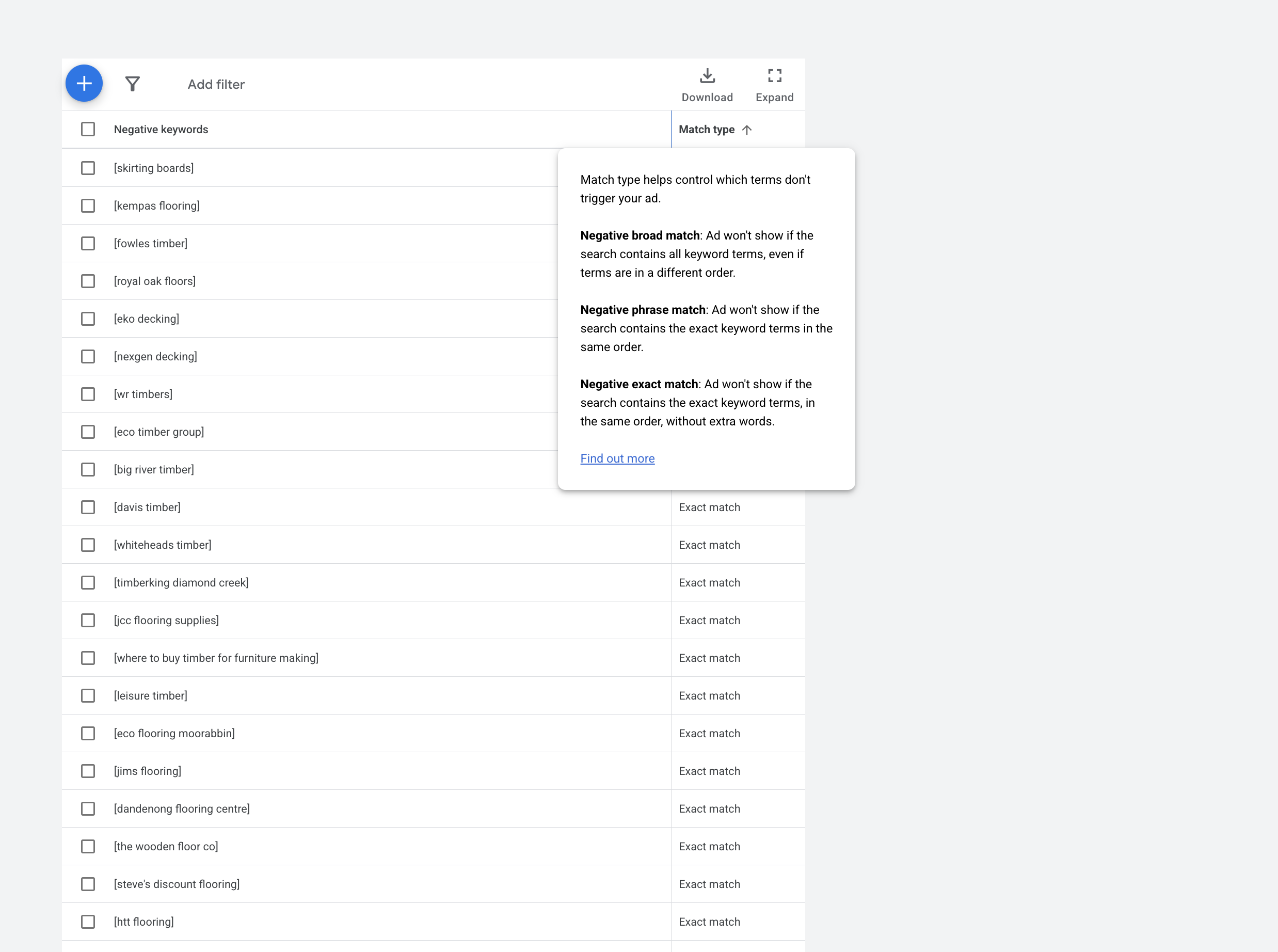
This might be the most overlooked budget-saver in all of PPC.
Negative keywords tell Google what searches NOT to show your ads for. And most businesses barely use them, if at all.
"The biggest problem with people, businesses, when they first run their campaign, is not having enough negative keywords in the list," Pat said.
Think about it. You're an accounting firm. You want business clients who need accounting services. You don't want:
- Job seekers searching "accounting jobs"
- Students searching "free accounting help"
- DIYers searching "how to do accounting myself"
But without negative keywords, you'll get all of them. And every click costs you.
Pat mentioned this is especially critical if you're using phrase match or broad match. "Negative keywords prevent irrelevant search terms from coming through into your campaigns, things like competitors or how-to tutorials that aren't matching the intent of the searcher."
Start your negative keyword list before you even launch. Think through all the ways someone could search for something related to your business but wouldn't be a customer. Add them all as negatives.
Then, once you're running, check your search terms report every week. You'll find more. Add them immediately.
There's something else Pat mentioned that I found interesting. Sometimes perfectly relevant keywords just don't convert. The search makes sense. The person seems qualified. But they never become customers.
"Sometimes you'll find that even though the keyword matches perfectly with the intent of your customer and that search term does as well, it just doesn't convert. It's just how human behaviour works. It's very strange."
When that happens, add them as negatives too. Doesn't matter if they seem relevant on paper. If they don't convert after a fair test, they're wasting your money.
How to Actually Structure Campaigns (The Simple Way)
Pat keeps the campaign structure really simple. And I think that's probably the right call for small businesses.
"A one single focus campaign with maybe a few ad groups and keywords, just tight, tight-knit and focus on just your local area with a 10-kilometre radius."
One campaign. Not five. One.
A few ad groups inside it, each focused on a specific service or product. And within each ad group, maybe five to ten closely related keywords.
Why so tight? Because it lets you write really specific ads. When someone searches for "emergency electrician Paddington," your ad talks specifically about emergency electrical service in Paddington. Not just generic electrical work.
That specificity matters. Google rewards it with lower costs and better ad positions. Users click on it more because it's exactly what they're looking for.
It also makes the data cleaner. When everything's mixed together in one giant campaign, you can't tell what's working. Is it the keywords? The location? The time of day? Who knows.
But when it's tightly organised, the data tells a clear story. "As you start getting leads and you're starting to grow, then we can look to expand," Pat said.
Start focused. Stay focused until it works. Then replicate what's working in new areas.
Settings That Actually Matter (The Ones People Skip)
Most people set up a campaign and just… leave everything on default. But a couple of settings can make a real difference to how much you spend.
Don't Run Ads When You're Asleep
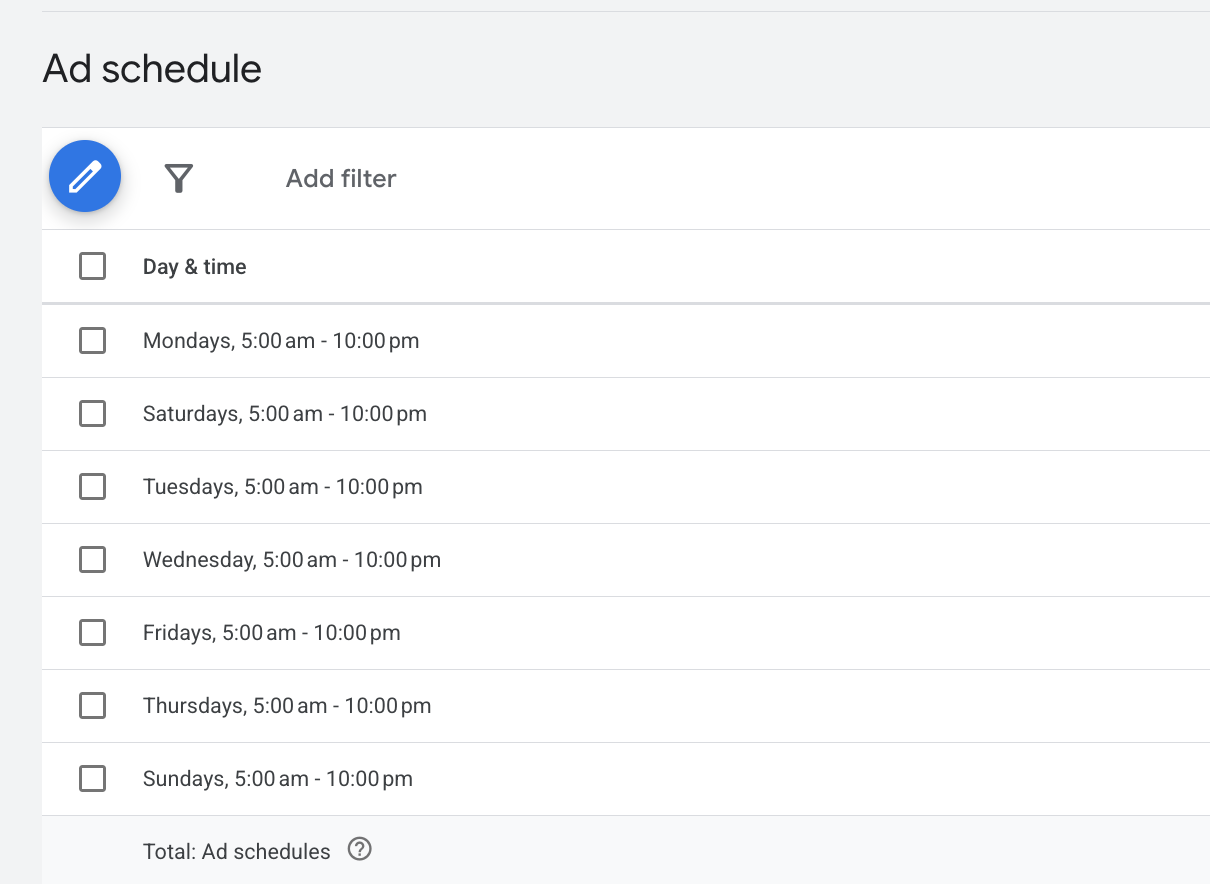
Unless you sell globally or have 24/7 customer service, you probably don't need ads running at 3 AM. But by default, that's what happens.
Pat mentioned an accounting firm as an example. "An accounting firm in Sydney probably doesn't need its ads running at 3 AM on a Sunday."
Use ad scheduling. Set your ads to show during business hours when people can actually reach you. Or during the times when your customers are most likely to be searching.
It's a simple change. But it means your budget goes toward high-probability times instead of getting wasted overnight.
Start With Manual Bidding
Google's automated bidding strategies are powerful, but they need conversion data to function properly. When you're just starting out with limited budget, you don't have that data yet.
Manual CPC bidding gives you complete control over your maximum cost per click. You set the limits, and the system can't exceed them. This prevents the platform from burning through your budget during its learning phase.
Once you've accumulated enough conversion data, ideally after hitting those 30 conversions, you can experiment with automated bidding strategies that use machine learning to optimise performance. But in the beginning, keeping manual control protects your budget while you gather the data that those automated systems need to work effectively.
The Three Metrics You Should Actually Watch
There are a million things you could track. Pat focuses on three.
1 - Cost Per Acquisition at Every Level

How much does each conversion cost? That's your CPA. But don't just look at the overall number. Drill down.
"If you see your campaign cost per acquisition going up, you're going to drill down into the ad groups and look at what's causing this ad group's cost per acquisition to go up. Then you're going to look at the keywords."
Maybe your overall CPA looks fine at $50. But when you drill down, you find one ad group at $150 and another at $25. That's a problem. The expensive one is dragging everything down.
Find it. Pause it or fix it. Move the budget to what's working.
2 - Search Terms Report
This shows you the actual searches that triggered your ads. Not the keywords you bid on, the real searches people typed into Google.
"Are there any irrelevant search terms coming through that don't match the intent of the customer?" Pat asks.
The answer is almost always yes. Even with good keywords and negatives, weird stuff gets through. Check this weekly. Add the irrelevant terms as negatives immediately.
I asked Pat about this earlier oddity he mentioned; sometimes, relevant terms just don't convert. He confirmed: if a term looks right but doesn't convert after a reasonable test, cut it.
"It's just how human behavior works. It's very strange." But the data doesn't lie. If it's not converting, it's costing you money for nothing.
3 - Where the Budget Actually Goes
Look at where your money is flowing. Is one ad group eating 60% of your budget while the others get nothing?
"Is all the volume being sucked up by one ad group? Then we need to maybe turn that off and allow for that budget to go to the other ads."
Sometimes you'll find a really competitive keyword that gets tons of clicks but terrible conversion rates. It's draining your budget. Turn it off or lower the bid dramatically.
This is about allocation. Your budget is limited. Make sure it's going to the things that actually deliver results, not just the things that get clicks.
Check these three things weekly. Not daily, that's too much noise. Not monthly, that's too slow to catch problems. Weekly is the sweet spot.
Long-Tail Keywords Are Your Best Friend

If I had to pick one strategy that matters most for small business budgets, it's probably this: focus on long-tail keywords.
Long-tail keywords are specific, longer phrases. Instead of "plumber" (two competitors and a job seeker just bid against you), you bid on "emergency burst pipe plumber Paddington."
Yes, fewer people search for that exact phrase. But the people who do are exactly who you want. They're in Paddington. They have a burst pipe. They need help now. That's a qualified lead.
And because it's so specific, fewer businesses bid on it. Which means it costs less.
Pat didn't spell this out directly, but it's implied in everything he said about focus and specificity. The businesses that succeed on small budgets are the ones that target very specific, high-intent searches instead of trying to compete on big, generic terms.
Google's Keyword Planner is free. Use it to find these longer phrases. Look for terms with decent search volume (you need some traffic) but lower competition.
Testing Without Wasting Money
You should test your ads. But don't test everything at once because you'll have no idea what actually made the difference.
Change one thing at a time. Test two headlines. Keep everything else the same. See which one performs better. Use that winner, then test something else.
For example:
- "Affordable Emergency Plumbing" vs "24/7 Emergency Plumber Brisbane"
- "Get a Free Quote" vs "Call Now for Immediate Help"
- Focus on price vs focus on speed
Let each test run long enough to mean something. Usually, at least 100 clicks or two weeks, whichever comes first. Then pause the loser and create a new variation to test against your winner.
Small improvements compound. A 5% better click rate here, a 10% better conversion rate there. Over time, these add up to campaigns that perform way better than your first version.
But you need proper conversion tracking for this to work. If you can't track what converts, you're just guessing. Make sure you're tracking form fills, phone calls, purchases, whatever matters to your business.
Automated Rules (Set It Up Once, Protect Your Budget Forever)
This is one feature most people don't use but should. Automated rules in Google Ads let you set conditions that trigger actions automatically.
Like: "If any keyword spends more than $200 without a conversion, pause it."
Or: "If a campaign's CPA goes above $100, send me an email."
These rules protect you when you're not watching. Maybe you're on vacation or just busy running your business. The rules keep running, catching problems before they drain your budget.
Some useful rules:
- Pause keywords with CPA above a certain amount after X clicks
- Alert me if any keyword takes more than 25% of daily budget
- Increase the budget by 10% on campaigns, hitting a really good ROAS
- Pause ads with terrible click-through rates after enough impressions
Set these up once. They'll save you money over and over.
Industry Costs: Know What You're Up Against
Not all industries cost the same. This matters for budgeting because you need to know what's realistic.
If you're in finance, insurance, or legal services, clicks might cost $10-15 each. Sometimes more. These industries are expensive because the customer value is high. One personal injury client might generate $50,000 in revenue, so lawyers will pay $30 for a click.
Ecommerce and retail are usually cheaper, maybe $2-4 per click. Lower customer values mean lower sustainable CPCs.
Local services like plumbers and electricians are somewhere in the middle, around $4-8 per click.
This affects everything. If you're in a high-cost industry with $15 clicks, you need a bigger budget to hit those 30 conversions. There's no way around it. Your $1,000 might get 66 clicks. Even with a 10% conversion rate (which would be good), that's only 6-7 conversions per month.
If you're in a lower-cost industry, that same $1,000 goes further. You might get 300 clicks at $3.50 each. At 10% conversion, that's 30 conversions. Right at the threshold.
Know your industry benchmarks. It helps set realistic expectations.
When You're in an Expensive Industry

If you're stuck with high CPCs, let's say you're a mortgage broker or lawyer, you need to be even more surgical with your approach.
Focus entirely on long-tail keywords. Don't even think about bidding on "lawyer" or "home loan." You'll burn through your budget in days.
Instead, go super specific: "first home buyer loan broker Adelaide" or "workplace injury compensation lawyer Sydney CBD."
These phrases cost less (fewer competitors) and convert better (more specific intent).
Build a massive negative keyword list. Your budget has zero room for waste. Every irrelevant click is devastating.
Consider retargeting heavily in high-cost industries. The customer values justify following up. Someone who visited your site once but didn't convert might just need another touch point. A modest retargeting budget can dramatically improve your overall ROI.
Real Budget Examples
Let me give you some concrete numbers so this isn't all theoretical.
Local Electrician
- Monthly budget: $1,500
- Target area: 10km radius
- Focus: Emergency electrical services
- Keywords: 15 exact match terms like "emergency electrician [suburb name]"
- Expected results: 15-20 leads at $75-100 each
- Strategy: Hyper-local, emergency-focused, tight scheduling around business hours
Small E-commerce Store
- Monthly budget: $2,500
- Target: Nationwide
- Focus: Google Shopping + branded search
- Expected results: 80-100 conversions at $25-30 each
- Strategy: Volume-based, watching ROAS closely, segment by product
B2B Service Business
- Monthly budget: $3,000
- Target: Major cities only
- Focus: Specialised services
- Keywords: 20-25 long-tail combinations
- Expected results: 10-15 qualified leads at $200-300 each
- Strategy: High-intent only, retargeting for follow-up, consultation-focused
These aren't guarantees. But they're realistic starting points based on typical industry costs and conversion rates.
Common Mistakes to Avoid
Let me just list these quickly because they're all important:
- Setting budgets without goals. If you don't know what you're trying to achieve, you can't know if your budget is right.
- Ignoring the 30 conversion rule. Under-budgeting just makes everything more expensive in the long run.
- Spreading budget across too many campaigns. Focus beats dispersion every time when money's tight.
- Setting up campaigns and forgetting about them. This isn't passive income. PPC requires active management.
- Using automation too early. Those systems need data. Give them some before you let them control your budget.
- Not tracking conversions properly. If you can't measure it, you can't improve it.
- Ignoring Quality Score. Low quality scores mean you pay more for the same results. Relevance matters.
Your Action Plan

If you're starting from scratch:
Week 1: Set your goal. Work backwards to figure out the budget you actually need. Research industry costs. Pick 10-15 long-tail keywords. Build a negative keyword list. Set up conversion tracking properly.
Week 2-3: Build one focused campaign. Set manual bids. Tight geographic targeting. Write a few ad variations. Schedule ads for business hours only.
Week 4-6: Just watch. Don't change much yet. You need data. Check search terms weekly and add negatives, but otherwise let it run. Track toward those 30 conversions.
Week 7 and beyond: Now you can optimise. Start testing ad copy. Adjust bids. Pause what doesn't work. Gradually expand geography. Maybe try automated bidding if you've got the data.
If you already have campaigns running:

Immediately: Audit all keywords, pause non-converters. Add more negative keywords. Tighten geographic targeting. Set up automated rules.
Weekly: Review search terms and add negatives. Check CPA at all levels. Watch where the budget goes. Test new ad variations.
Monthly: Big picture review. What's working? What should you scale? What should you cut completely?
When to Get Help
Look, most small businesses can manage their own PPC if they follow this advice. But there's a point where it stops making sense.
If campaign management is taking you 10+ hours a week, and those hours could make you more money doing your actual business, outsource it.
If your monthly spend gets above $5,000-$10,000, the complexity usually justifies professional management.
If you've been optimising for months and nothing improves, fresh eyes might spot something you're missing.
If you're in a super competitive industry with $10+ clicks, experienced specialists execute more effectively.
Pat and his team can help when you reach that point. "If you need help, you can always reach out to us, and we can have a chat to see if we might be the right fit to work together."
10 PPC Tips for Small Businesses (The Quick Reference List)

Alright, let me put everything into a simple list you can actually use. These are the ten things that matter most when you're running PPC on a small business budget.
1 - Set Your Budget Based on Goals, Not Gut Feel
Stop guessing what you can afford and start calculating what you need. Want an extra $20,000 in revenue? Work backwards. How many customers is that? How many leads do you need? What will those leads cost?
Sometimes the math won't work with your available budget. That's fine. At least you'll know where you stand instead of hoping $500 a month somehow delivers miracle results.
2 - Hit 30 Conversions Monthly (This Is Non-Negotiable)
Google needs 30 conversions per month to optimise properly. Under that threshold, the algorithm can't learn who your customers are. Your costs will be all over the place.
If your budget can't generate 30 conversions, you're better off increasing it or focusing somewhere else until you can afford to do PPC properly. I know that sounds harsh, but it's the reality of how the platform works.
3 - Start Hyper-Local (Then Expand)
Don't target your entire city right away. Start with a 10km radius around your actual location. This is especially critical for service businesses.
Someone in Carindale isn't hiring a plumber from Boondall. They're hiring someone local. Why pay for clicks from people who won't choose you anyway?
Prove the model in your immediate area first. Then expand once you're getting consistent conversions.
4 - Use Exact Match Keywords (Forget Broad Match)
Yeah, Google says broad match works great with their AI. Pat's data says otherwise.
Broad match bleeds your budget on irrelevant searches. You'll get DIY queries, job seekers, competitor searches, all kinds of stuff that costs money but never converts.
Start with exact match. Be specific. Keep control over where your dollars go.
5 - Build a Massive Negative Keyword List
This might be the most important tip that nobody follows. Start your negative keyword list before you even launch campaigns.
Think through every way someone could search for something related to your business, but not be a customer. Add them all as negatives. Then, check your search terms report every single week and add more.
Your budget is too small to waste on irrelevant clicks.
6 - Run One Focused Campaign (Not Five)
Don't spread $1,500 across Performance Max, Search, Display, and Shopping. Pick one. Usually, search for local businesses.
One campaign. Tight geographic focus. Specific keywords. Make that work before you add complexity.
Multiple campaigns split your budget so thin that none of them have enough data to optimise. You end up with five mediocre campaigns instead of one good one.
7 - Schedule Ads for When It Matters
If you're a B2B business, you probably don't need ads running at 3 AM on Sunday. If you're closed on Mondays, turn off your ads.
Use ad scheduling to run ads only during high-probability times. It's a simple setting that can save 20-30% of your budget by cutting out dead hours.
8 - Watch Three Metrics Weekly
Don't get lost in data. Focus on three things every week:
Cost per acquisition at every level - Drill down from campaign to ad group to keyword. Find what's expensive and either fix it or pause it.
Search terms report - What actual searches triggered your ads? Add irrelevant ones as negatives immediately.
Budget allocation - Where's your money actually going? Is one ad group eating 60% of the budget without delivering results? Reallocate.
That's it. Three metrics. Weekly. You'll catch problems before they drain your budget.
9 - Test One Thing at a Time
Test your ads, but change only one element. Two headlines with everything else the same. Two CTAs with everything else the same.
If you change three things at once, you won't know what made the difference. Let each test run for at least 100 clicks or two weeks. Then use the winner and test something else.
Small improvements compound into big results over time.
10 - Set Up Automated Rules (Your 24/7 Budget Guard)
Create rules that protect your budget automatically:
- Pause keywords if CPA goes above $X after Y clicks
- Email me if any keyword takes more than 25% of the daily budget
- Pause ads with terrible click-through rates after enough impressions.
These rules catch problems when you're not watching. Set them up once, and they'll save you money over and over.
Start Small, Scale Smart

PPC budgeting isn't about having the most money. It's about deploying what you have strategically.
The businesses that succeed on small budgets do these things consistently. They don't try to compete everywhere. They focus tight, optimise relentlessly, and scale only what's proven to work.
Pat's final word: "Look at your goals and work your way back from that. It doesn't need to be daunting when setting your budget."
He's built a budget calculator to help you figure out exactly what you need. If you want that, reach out to Websites That Sell for a budget review. Alternatively, for more information on the cost of Google ads for your business, click here.
But honestly? You can get started right now with what you learned here. Pick a goal. Work backwards. Start small and focused. Watch the right metrics. Optimise weekly.
That's it. That's the whole strategy.