

Technical SEO is simply about how your website functions, how people interact with it, and whether it actually works when someone lands on it.
Think of poor technical SEO like driving with the handbrake on. Your car still moves, sure, but you can feel that dead weight holding you back. There's no momentum. You're hitting the accelerator but something's wrong.
Poor technical SEO does this to your rankings. It won't necessarily stop you from ranking (unless things are really broken), but it will quietly slow you down. When you get your technical SEO sorted, you release that handbrake and start to accelerate.
We’ve spent 15 years ranking sites across Australia. Here's what actually matters for local business owners who want to stop leaving money on the table.
Watch the full interview here:
Making Sure Google Can Find and Index Your Website
Before you worry about keywords or content strategy, you need to make sure Google can actually see your site. This is where most small businesses unknowingly shoot themselves in the foot.
The No-Index Tag Mistake That Kills Visibility
The biggest technical mistake that still happens today? Web developers set sites to "no index" and "no crawl" during development (so Google doesn't discover the unfinished site), then launch the live site with those same settings still on. The result is the business still can't be found on Google, even though their shiny new website is live.
It's a tiny oversight that's incredibly easy to make, and it's probably the most common technical issue affecting Australian small businesses right now.
Understanding Crawlability vs Indexability
Crawlability means Google's bots can access and read your website. They're not blocked out, they can see what's on your pages, and they understand what you're about.
Indexability is different. You can let Google crawl your site but tell them not to include it in their search index. If you're not in Google's index, you won't show up when people search for what you do. You're simply not in their library of information.

Your robots.txt file is where you tell Google these rules. Think of it as the bouncer at the door - it tells Google what they're allowed to see and what they should ignore.
When Sitemaps Can Actually Hurt Your Rankings
Here's something that might surprise you: sitemaps aren't always helpful, and sometimes they can actually hurt your rankings.
For brand new sites, sure, submit a sitemap. It helps Google understand your structure quickly. But if Google has already been crawling your site for years and understands its structure, suddenly submitting a sitemap can confuse things. We saw a real case of an Australian skip bin company ranking number one across every major city for years. A new SEO installed a sitemap, and overnight, rankings dropped four to five positions. When the sitemap was removed, the rankings returned.
The lesson? Don't just tick SEO boxes for the sake of it. If Google already knows your site intimately, introducing a new structure can throw them off.
Fixing Server Errors, Redirects, and Broken Links
Which Technical Problems Actually Matter Most
Not all technical issues are created equal. Here's what actually damages your site the most, in order:
Server errors are your worst-case scenario. If nothing loads, you've got a critical problem. Users can't get to your site, and that's game over.
Redirect chains come next. These happen when you redirect from page A to page B to page C to page D. Something can break along the way, and you lose link power in the process. Best practice: cut out the middleman. Redirect everything directly to the final destination.
Broken links are frustrating for users, but they're not catastrophic. People might try another way to find what they need. Still, all things being equal, you want to fix these to stay competitive.
How Page Speed Actually Affects Rankings
Page speed matters, but the reality is more nuanced than most articles suggest. If the top three sites in your market load in one to two seconds, you want to hit that benchmark. But slower sites can and do rank well. Sites taking five or six seconds to load still perform if they offer something unique.
The real question is user experience. If your site takes 10 seconds to load and there are faster competitors, users will bounce. But if you're the only one who does what you do, they'll wait.
That said, improving site speed has directly improved rankings in countless cases. It's a factor, but it comes down to providing better user experience, which then drives up rankings.
Optimising Images for Faster Load Times
For non-technical business owners, images are your fastest path to better load times. Many people upload images that are way too large. If you only need an image that's 500 pixels wide, but you're loading one that's 5000 pixels wide, you're going to slow down your website unnecessarily.
Get your images to the right size first, then use compression tools to reduce file size without destroying quality. Just be careful, some third-party tools strip out EXIF data and other information that actually helps search engines understand what your images are about. Compress smart, don't strip away valuable data.
Testing Your Site Speed from Australian Servers
Most speed testing tools run from overseas servers, which gives Australian businesses inaccurate results. GT Metrics and Google's tools often load from the US or Canada, testing how long it takes to load Australian content from over there.

Use Pingdom and set your test location to Sydney. This tests from Australian servers and give you realistic load times for your actual customers. Google's tools are fine for benchmarking, but they won't tell you what Australians actually experience.
For the more technically inclined, Chrome's Developer Tools (specifically Lighthouse and the Network tab) give you real-time insights into what's slowing your site down. You might discover a third-party script you can defer or remove entirely.
What Core Web Vitals Measure and Why They Matter
Core Web Vitals measure three critical things:
- Loading performance - How fast does your site load?
- Interactivity - How easily can users interact with your site? Are there broken links? Is content hidden behind unnecessary forms?
- Visual stability - When your site first renders, do you give users the complete picture, or does content keep shifting as things load?
That last one is called cumulative layout shift, and you've experienced it. You're reading an article, an ad loads, and suddenly you've lost your place because everything jumped down the page. Frustrating, right?
Stop thinking about only optimising for search engines. Think about your users. If it's fast to load, easy to use, and visually stable, you're on the right track.
Why Mobile Optimisation Matters More Than Desktop
The majority of Australian users are browsing on mobile devices. For most industries, mobile traffic is the largest contributor to conversions. If you're not optimised for mobile, you're not catering to your biggest audience.
Google uses mobile-first indexing, which means they primarily use the mobile version of your site for ranking and indexing. Your desktop performance matters less than ever.
How to Test Your Mobile User Experience
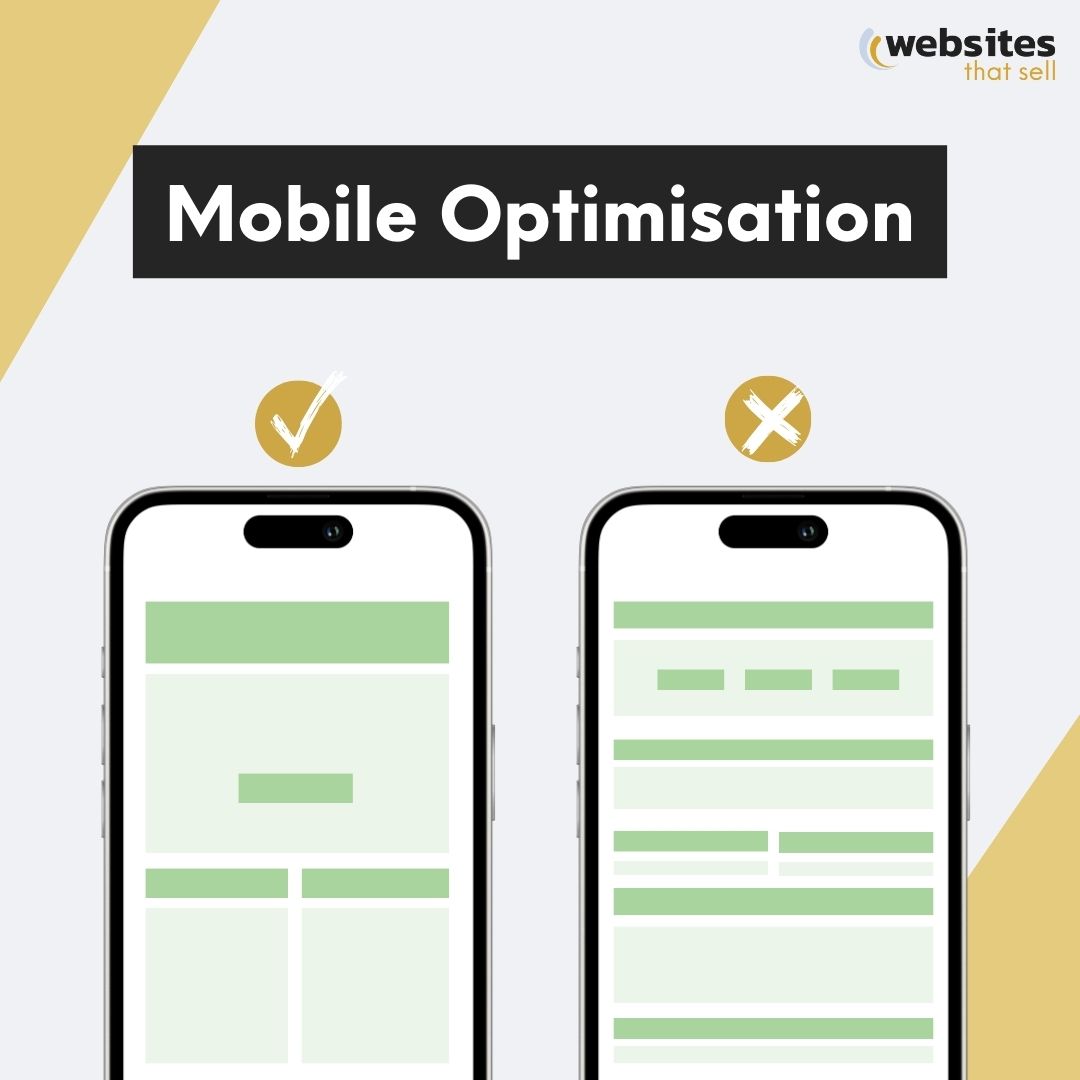
Pull out your phone and actually use your website. Does content go off the screen? Do images take up three scrolls? Can you easily tap buttons without accidentally hitting something else? If the experience frustrates you, it frustrates your customers.
Check that your contact number is clickable (click-to-call), forms work properly, and images are appropriately sized for mobile screens. Then use Google's speed tools to check your mobile score specifically.
Organising Your Site Structure to Build Authority
The bigger your site and the more categories you target, the more critical your structure becomes.
If you're a local business offering one service in one region, structure matters less; every page naturally relates to your core offering. But the moment you operate in multiple regions or offer multiple services,
Google needs help understanding what you do and where you do it.
Using Silos to Group Related Content
Think about an e-commerce clothing store. You've got shoes, shirts, and shorts as main categories. Your shoes don't naturally link to your shorts, and your shorts don't link to your shirts. They're separate silos.
Within your shoes category, you might have Nike, Reebok, running shoes, hiking boots. These all link up to the shoes category page but don't link across to pants or shirts. When you organise content this way, you build powerful theme relevance and authority for that specific silo.
The same principle applies to service businesses. If you're a plumber operating on the Sunshine Coast, your Sunshine Coast content shouldn't link to Sydney service pages. Someone in Noosa doesn't care about your Sydney services, it's not good user experience, so it's not good SEO.
Link up and down within silos. Don't link across to partially relevant content. This builds depth of expertise and helps Google understand exactly what each section of your site is about.
What to Do With Orphan Pages
An orphan page is exactly what it sounds like: a page without a home. It doesn't belong anywhere in your site structure and has no parent page.
Classic example: you've got a clothing site and suddenly there's a random page about cats with no connection to anything else. If you absolutely need that page, make it relevant (like best clothing for cat owners) and link it properly into your structure.
Most often, you've got three options: make it relevant and link it properly, tell Google to ignore it (if you need it for ads but not SEO), or just delete it if it's not needed.
How Internal Linking Improves Your Rankings
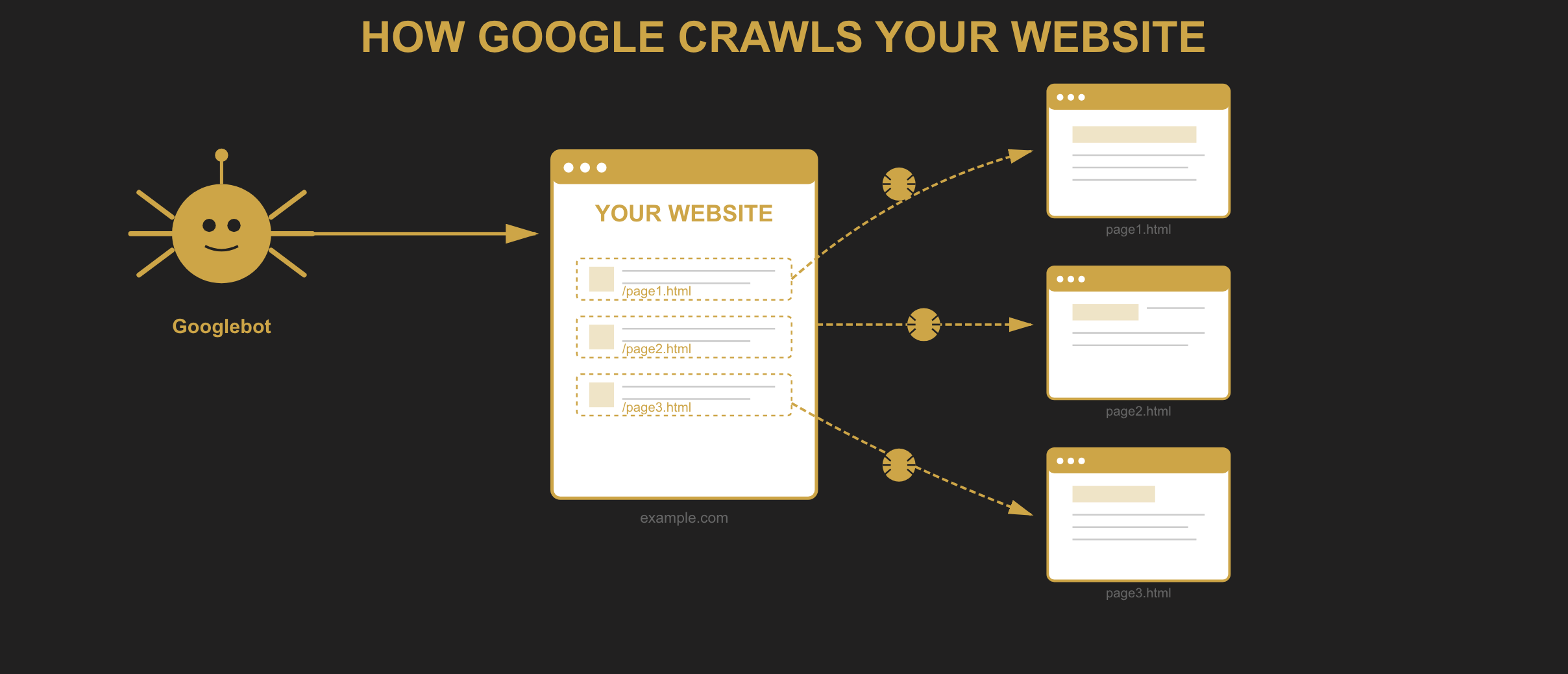
Internal linking is one of the fastest ways to improve rankings because it makes it incredibly easy for Google to understand what your site is about and which pages relate to each other.
When you link related pages together within a silo, you show Google the depth of your expertise on that topic. Instead of just covering something superficially, you've got comprehensive, connected content that demonstrates authority.
This directly feeds into Google's E-E-A-T (Experience, Expertise, Authoritativeness, and Trustworthiness) algorithm. Strong internal linking builds that expert status, and rankings improve. It's been proven across thousands of sites over more than a decade.
Keeping Your Website Secure and Trustworthy
Why HTTPS Matters for SEO and Conversions
Google moved to HTTPS-only a couple of years back. If your site doesn't have it, users see a big red warning screen asking if they trust your website. Even if your site still loads, it screams danger. Most users will bounce immediately.
This isn't just about SEO - it's about not scaring away potential customers.
Maintaining Clean Code to Prevent Security Issues
Think of your website like your house. You don't let dust and clutter build up for years. The same applies to your site's code and plugins.
Old, outdated code can leave backdoors for hackers. There are real cases of Australian businesses getting hacked without knowing it, suddenly having gambling links and pages added to their site. Their rankings slowly dropped because Google got confused about what they actually did - wedding celebrants don't offer gambling services.
Worst case? Google de-indexes your entire site to protect their users from malicious code.
Have a cleaning schedule. Get your developer to do a quarterly check, update plugins, remove old unused code, and stay on top of security updates.
Managing Duplicate Content and Canonical URLs
Duplicate content gets a bad reputation, but the reality is more nuanced.
If you're targeting multiple regions (Sydney, Brisbane, Melbourne) and the information is genuinely the same for each location, having duplicate content makes sense for user experience. This has never been observed to hurt rankings when it serves a legitimate purpose.
But if the information genuinely differs, maybe due to different legislation, climate considerations, or local factors, then you need unique content for each location.
Canonical tags tell Google which version of similar pages to focus on. This is common in e-commerce when you have multiple product variations. You're saying "I know I've got 15 similar pages, but focus on this one."
Preventing Keyword Cannibalisation
The real problem is when you create multiple pages targeting the same topic in slightly different ways. Google gets confused about which page to rank, both pages wrestle for position, and often both fall back in rankings.
One topic per page. Don't create separate pages for "luxury watches" and "expensive watches" - they're semantically the same thing. Google understands that luxury means expensive. Put it all on one master page and rank that page for all related terms.
Using Schema Markup to Stand Out in Search Results
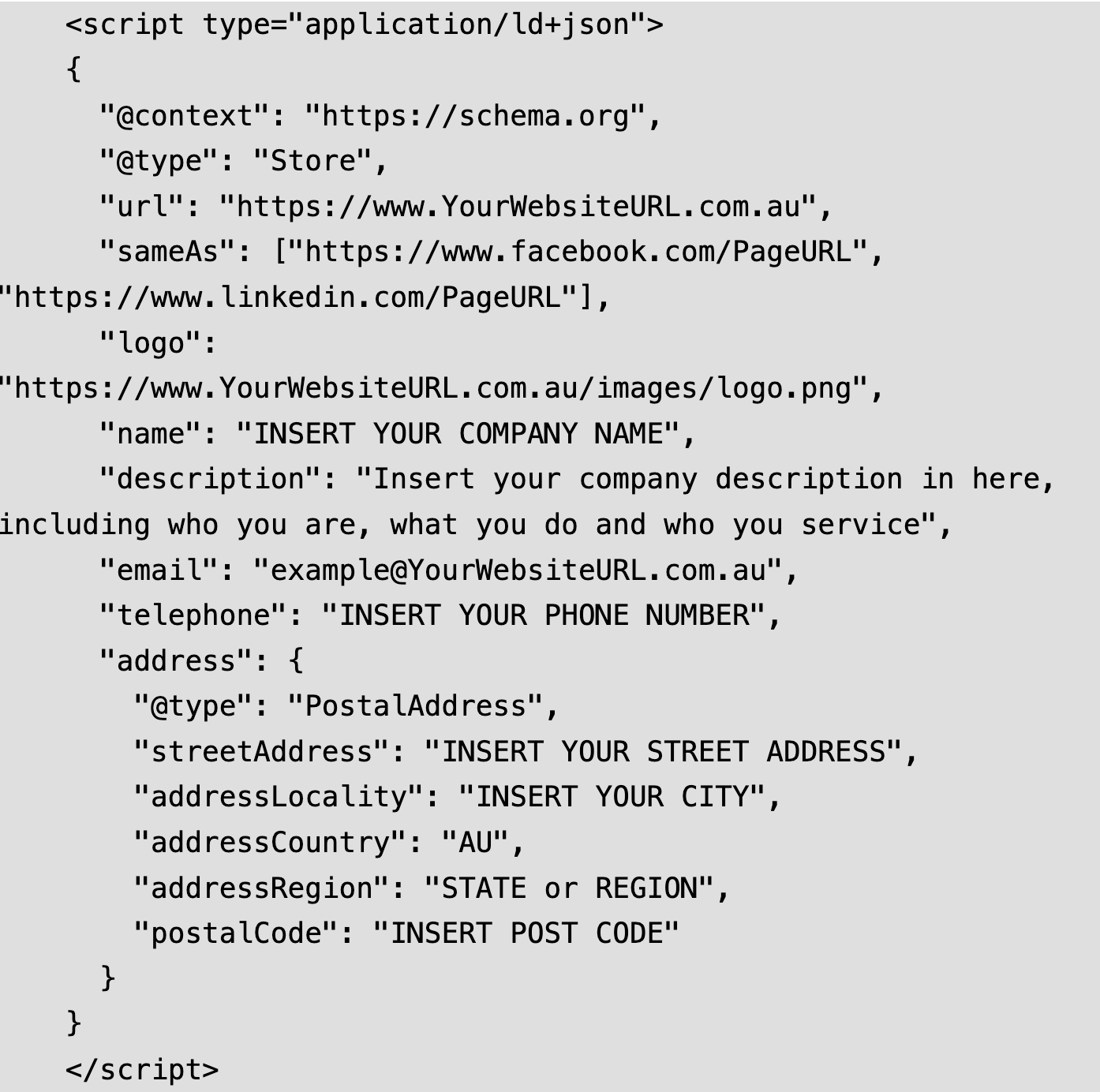
Schema markup is code that helps bots better understand your content. It's not visible to users (unless you implement it wrong and it shows up as random code on your page).
For local Australian businesses, two types of schema matter most:
Organisation schema tells Google who you are, where you operate, your opening hours, and your contact details.
Review schema is potentially more powerful because it shows star ratings directly in search results. Even if you're ranking second, having 237 five-star reviews showing in the search results can steal clicks from the number one position that doesn't use schema.
As AI search evolves, schema is becoming even more critical. Google and other search engines pull this structured data directly into AI-generated results. Your product prices, stock levels, and reviews already show up in search, and this will only increase.
How to Implement Schema Without Breaking Your Site
Don't just install a random schema plugin and hope for the best. Poorly coded plugins can slow your site, create conflicts with other tools, and cause technical problems.
Use Google's schema checker tool to validate your markup first, then work with a developer to implement it properly without plugins. It's worth the investment to get it right.
Getting Your Metadata Right
Despite what you might hear, basic SEO elements still work. They worked 15 years ago, they work now, and they'll continue working because this is how Google understands your pages.
The big three: title tag, URL, and meta description. Your title tag tells Google what the page is about and appears in search results. Your meta description gives you a chance to sell the click. Your URL should be clean and descriptive.
H tags (headings) set the scene for each page and help structure your content logically. Alt text tells Google what your images are about, which matters more as image content gets pulled into AI results.
How Often to Audit and Monitor Technical SEO
Technical SEO requires ongoing attention, but the frequency of checks depends on how reliant you are on your website.
Daily monitoring makes sense for large e-commerce stores where every minute counts and sales happen constantly. Use tools like SEMrush or Ahrefs to run automatic background checks.
Weekly or quarterly checks work fine for smaller businesses where the website generates a few leads per month. Your money is better spent on content and link building than obsessive technical monitoring.
Ask yourself: how valuable is my website to my business? That determines your investment in technical maintenance.
The One-Hour-Per-Month Checklist
If you only have an hour per month, focus on three things:
- Make sure your site loads (takes a couple of minutes to check main pages)
- Verify your main internal links work and users can navigate properly
- Work incrementally on site speed - even fixing 10 images per month compounds over time
Don't try to fix everything at once. Pick one thing, chip away at it, and maintain what's already working.
The Single Biggest Quick Win: Removing Unnecessary Pages
If you want one technical SEO action that delivers outsized results for the effort, it's this: cut unnecessary pages from your site.
Look for pages that are outdated, redundant, or were created for some reason you can't even remember. If pages can be combined or consolidated, do it. If they don't need to be in Google's index anymore, remove them or mark them no-index.
This condenses your theme relevance and makes your site dramatically stronger. It also frees up your crawl budget - Google only crawls a certain number of pages on your site regularly, so make those pages count.
This single action has consistently delivered ranking improvements across hundreds of Australian business sites. It makes your remaining content more powerful, more expert, and more trustworthy.
Focus on User Experience, Not Search Engines

The biggest misconception about technical SEO is that you need to please search engines. The reality: technical SEO is about making your website user-friendly.
If your site loads fast, works properly, is easy to navigate, and provides a stable experience, the technical SEO falls into place. Please your users, and you'll please the search engines.
Focus on function over complexity. Make sure Google can find and understand your site, ensure it works well for real people on real devices, and cut away anything that's dead weight.
Need help getting your technical SEO sorted? Our team at Websites That Sell has been helping Australian businesses rank since 2010. Get in touch to see how we can take the handbrake off your website.